
Honda CR-V: Gauges
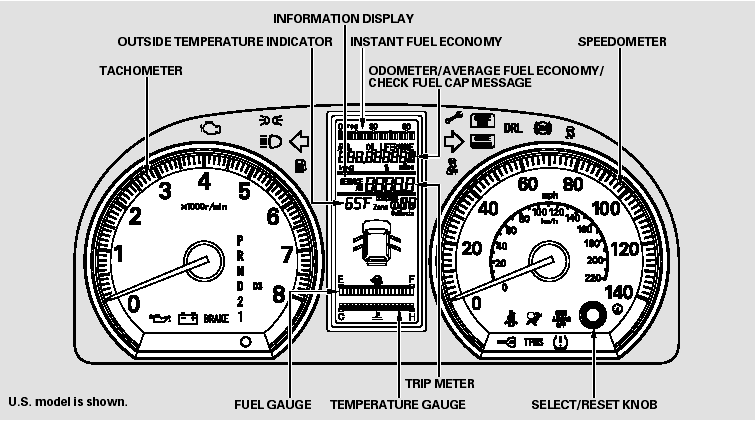
- Information Display
- TripMeter
- Instant Fuel Economy
- Average Fuel Economy
- Range (Estimated Distance)
- Odometer
- Fuel Gauge
- Temperature Gauge
- Outside Temperature Indicator
- Check Fuel Cap Message
- Maintenance Minder
READ NEXT:
 Information Display
The information display consists of
three segments. The upper segment
displays current fuel mileage, the
second segment displays the
odometer, average fuel mileage,
range (estimated dist
TripMeter
This meter shows the number of
miles (U.S.) or kilometers (Canada)
driven since you last reset it.
There are two trip meters: Trip A
and Trip B. Switch between these
displays by pressing the
Instant Fuel Economy
This display shows the instant fuel
economy you are getting.
It shows the number of mpg (U.S.)
or l/100 km (Canada).
SEE MORE:
Fan Controls
Component Location Index
RADIATOR FAN RELAY
A/C CONDENSER FAN RELAY
FAN CONTROL RELAY
A/C CONDENSER FAN ASSEMBLY
RADIATOR FAN ASSEMBLY
ENGINE COOLANT TEMPERATURE
(ECT) SENSOR 1
ENGINE COOLANT TEMPERATURE
(ECT) SENSOR 2
Symptom Troubleshooting Index
Circuit Diagram
Radiato
Self-diagnostic Function
Without Navigation
The audio system has a self-diagnostic function. To run the self-diagnostic
function, do the following:
How to check for audio system condition
NOTE: The audio unit must be in the code enter screen before doing the
self-diagnostic function.
1. Turn the ignition switch to the AC
© 2016-2026 Copyright www.hcrv.net
