
Honda CR-V: Idle Control System
Honda CR-V (2006–2011) Service Manual / Fuel and Emissions / Idle Control System
Component Location Index
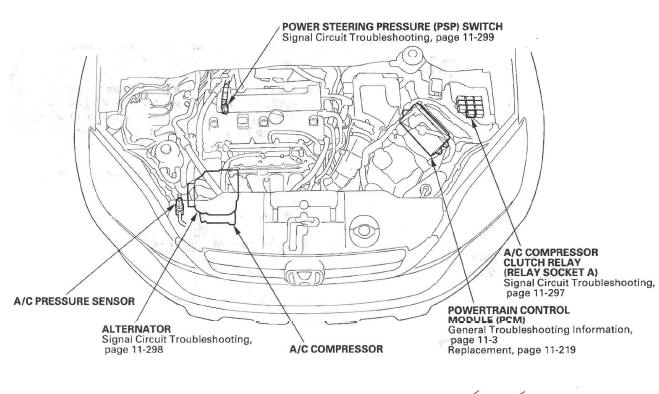
- POWER STEERING PRESSURE (PSP) SWITCH
- Signal Circuit Troubleshooting
- A/C COMPRESSOR
CLUTCH RELAY
(RELAY SOCKET A)
- Signal Circuit Troubleshooting
- POWERTRAIN CONTROL
MODULE (PCM)
- General Troubleshooting Information
- Replacement
- A/C COMPRESSOR
- ALTERNATOR
- Signal Circuit Troubleshooting
- A/C PRESSURE SENSOR
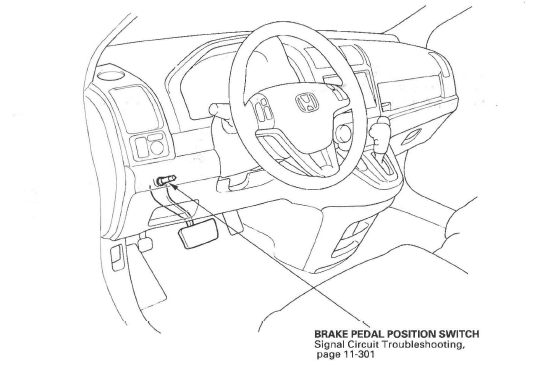
- BRAKE PEDAL POSITION SWITCH
- Signal Circuit Troubleshooting
- DTC Troubleshooting
- A/C Signal Circuit Troubleshooting
- PSP Switch Signal Circuit Troubleshooting
- Brake Pedal Position Switch Signal Circuit Troubleshooting
READ NEXT:
 DTC Troubleshooting
DTC P0506: Idle Control System RPM Lower
Than Expected
NOTE: Before you troubleshoot, record all freeze data
and any on-board snapshot, and review the general
troubleshooting information.
1. Turn the
A/C Signal Circuit Troubleshooting
1. Start the engine, and let it idle.
2. Turn the blower switch on.
3. Turn the A/C switch on.
4. Check the A/C CLUTCH in the DATA LIST with the
HDS.
Does it indicate ON?
YES-Go to step 5.
5. Check t
PSP Switch Signal Circuit Troubleshooting
1. Start the engine, and let it idle.
2. Align the steering wheel straight ahead.
3. Check the PSP SWITCH in the DATA LIST with the
HDS.
Does it indicate ON?
YES-Go to step 4.
NO-Go to step 14.
4.
SEE MORE:
Shift Lever
Shift Lever Removal
1. Remove the following parts:
Heater control panel
Dashboard center panel
Center lower covers
2. Shift the shift lever into the R position.
3. Remove the nut securing the shift cable end.
4. Unlock the retainer (A).
5. Rotate the socket holder retainer (A)
counterclockw
Changing a Tire with TPMS
If you have a flat tire, the low tire
pressure indicator will come on.
Replace the flat tire with the
compact spare tire.
Each wheel (except the compact
spare tire wheel) is equippedwith a
tire pressure sensor. You must use
TPMS specific wheels. It is
recommended that you always have
© 2016-2026 Copyright www.hcrv.net
