
Honda CR-V: Cooling System
Honda CR-V (2006–2011) Service Manual / Engine Cooling / Cooling System
Component Location Index
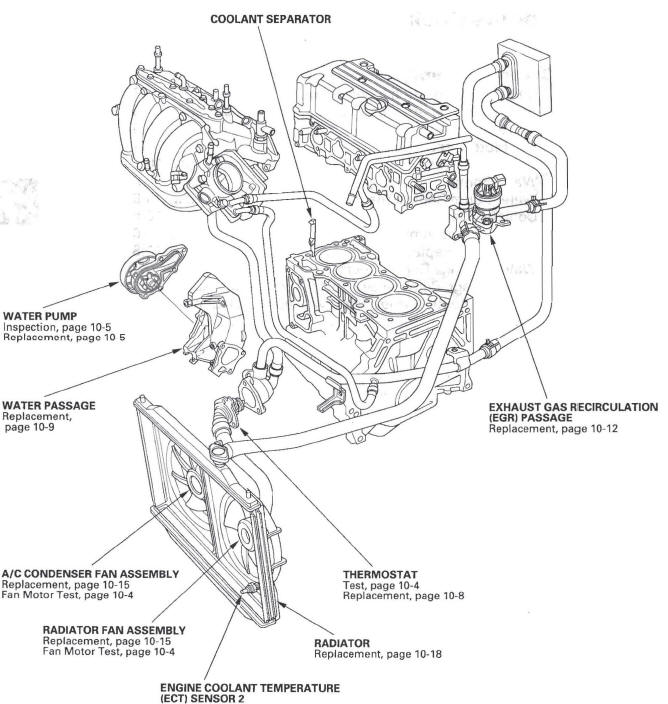
-
COOLANT SEPARATOR
-
EXHAUST GAS RECIRCULATION (EGR) PASSAGE
-
THERMOSTAT
-
RADIATOR
-
ENGINE COOLANT TEMPERATURE (ECT) SENSOR 2
-
RADIATOR FAN ASSEMBLY
-
A/C CONDENSER FAN ASSEMBLY
-
WATER PUMP
-
WATER PASSAGE
- Radiator Cap Test
- Water Passage Replacement
- EGR Passage Removal and Installation
- Fan, Fan Motor, Shroud Removal and Installation
- Radiator Replacement
READ NEXT:
 Radiator Cap Test
1. Remove the radiator cap (A), wet the seal with
engine coolant, then install it on the pressure tester
(B) (commercially available).
2. Apply a pressure of 93-123 kPa
(0.95-1.25 kgf/cm2, 14-18 psi)
Water Passage Replacement
1. Drain the engine coolant.
2. Remove the alternator.
3. Remove the condenser fan shroud assembly.
4. Remove the A/C compressor without disconnecting
the A/C hoses (see step 34).
5. Remove the in
EGR Passage Removal and Installation
Removal
1. Drain the engine coolant.
2. Remove the air cleaner housing.
3. Remove the harness holder (A) from the bracket,
then remove the harness holder bracket (B).
4. Remove the upper radiator h
SEE MORE:
Crossing a Stream
Avoid driving through deep water. If
you encounter water in your route (a
small stream or large puddle, for
example), evaluate it carefully before
going ahead. Make sure it is shallow,
flowing slowly, and has firm ground
underneath. If you are not sure of
the depth or the ground, turn
Ceiling Light
The ceiling light has a three-position
switch: ON, Door Activated, and
OFF. In the Door Activated (center)
position, the light comes on when
you:
Open any door.
Unlock the doors and the tailgate
with the key or remote transmitter.
After all doors and the tailgate are
closed tightl
© 2016-2026 Copyright www.hcrv.net
