
Honda CR-V: Differential Mount Replacement
Exploded View
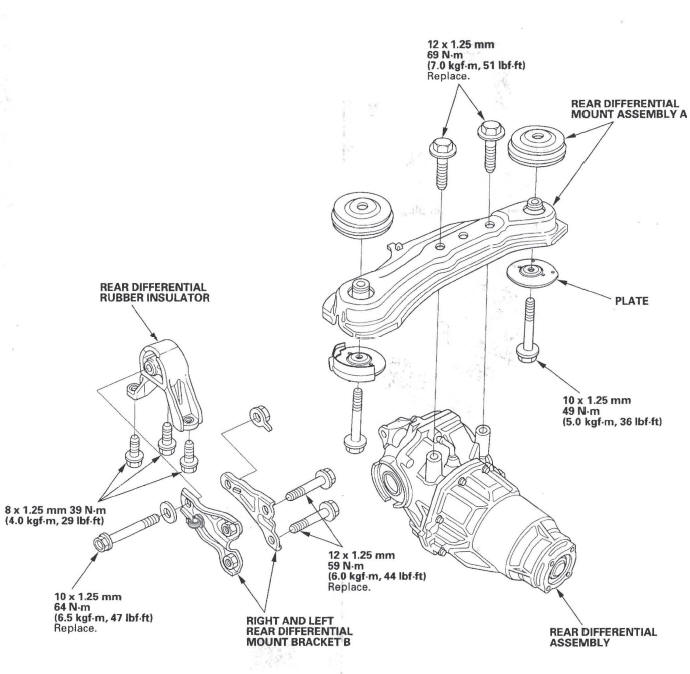
Differential Installation
1. Install rear differential mount assembly A to the rear differential assembly (B).
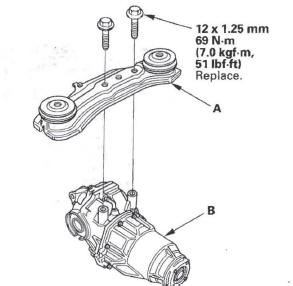
2. Jack up the rear differential.
3. Install the new set rings (A) onto the driveshafts, then insert the drives hafts into the rear differential.
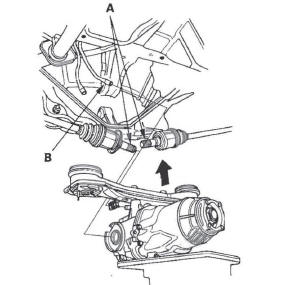
4. Lift the rear differential up into position, then push on both driveshafts to lock the set rings into place.
Connect the breather tube (B).
5. Align the tab (A) of the rubber mount (B) with the hole (C) of the plates (D), then install the plates and torque the rear differential mount assembly mounting bolts (E).
NOTE: The rubber heat insulator (F) is installed only in the right side.
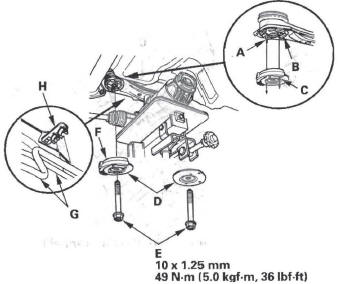
6. Install the breather tubes (G) to the clips (H).
7. Install the right and left rear differential mount brackets B (A), then torque the bolts (B).
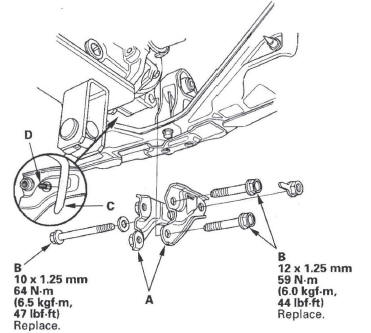
8. Install the breather tube (C) to the clip (D).
9. Install the No.2 propeller shaft (A) onto the rear differential (B) by aligning the reference marks (C) made during removal. Make sure you use new mounting bolts (D).
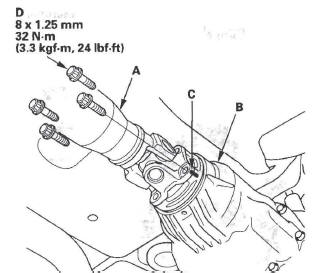
10. Fill the rear differential with the differential fluid to the proper level.
READ NEXT:
 Driveline/Axle
Special Tools
Oil Seal Driver
Attachment, 52 x 55 mm
Half Shaft Base
Threaded Adapter, 24 x 1.5 mm
Threaded Adapter, 26 x 1.5 mm
Attachment, 35 mm I.D.
Driver
Inner Handle, 30 mm
Oil Seal
Driveshaft Inspection
1. Check the inboard boot (A) and the outboard boot
(B) on the driveshaft (C) for cracks, damage, leaking
grease, and loose boot bands (D). If any damage is
found, replace the boot and boot bands.
2.
Front Driveshaft Disassembly
Special Tools Required
Threaded adapter, 26 x 1.5 mm 07XAC-001030A
Slide hammer, 5/8"-18 UNF, commercially available
Inboard Joint Side
1. Remove the set ring (A) from the inboard joint.
2. Remov
SEE MORE:
Keyless/Power Door Locks/Security
System
Component Location Index
NAVIGATION UNIT or
AUDIO UNIT
IMMOBILIZER-KEYLESS
CONTROL UNIT
(Built-in receiver)
MICU (Built into the under-dash fuse/relay box)
HEADLIGHTS
HORN
HOOD SWITCH
SECURITY INDICATOR
UNLOCK BUTTON
IGNITION KEY
PANIC BUTTON
LOCK BUTTON
TRANSMITTER
IGNITION K
Brake System Indicator
The brake system indicator normally
comes on when you turn the ignition
switch to the ON (II) position, and as
a reminder to check the parking
brake. It will stay on if you do not
fully release the parking brake.
If the brake system indicator comes
on while driving, the brake fluid le
