
Honda CR-V: VTEC/VTC
Honda CR-V (2006–2011) Service Manual / Fuel and Emissions / VTEC/VTC
Component Location Index
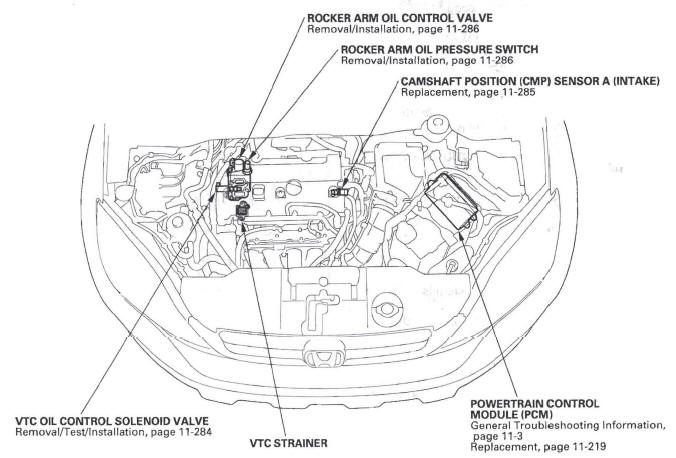
-
ROCKER ARM OIL CONTROL VALVE
-
Removal/Installation
-
-
ROCKER ARM OIL PRESSURE SWITCH
-
Removal/Installation
-
-
CAMSHAFT POSITION (CMP) SENSOR A (INTAKE)
-
Replacement
-
-
POWERTRAIN CONTROL MODULE (PCM)
-
General Troubleshooting Information,
Replacement
-
-
VTC STRAINER
-
VTC OIL CONTROL SOLENOID VALVE
-
Removal/Installation
-
READ NEXT:
 DTC P0010: VTC Oil Control Solenoid Valve
Malfunction
DTC P0010: VTC Oil Control Solenoid Valve
Malfunction
NOTE: Before you troubleshoot, record all freeze data and any on-board
snapshot, and review the general troubleshooting information.
1. Turn the ignition switch ON (II).
2. Clear the DTC with the H
DTC P1009: VTC Advance Malfunction
NOTE:
Before you troubleshoot, record all freeze data and any on-board
snapshot, and review the general troubleshooting information.
If DTC P0341 is stored at the same time as DTC P1009,
trouble
SEE MORE:
SRS (Supplemental Restraint System)
Component Location Index
SRS INDICATOR
SIDE AIRBAG CUTOFF INDICATOR
MEMORY ERASE
SIGNAL (MES)
CONNECTOR (2P)
(YELLOW)
CABLE REEL
PASSENGER'S AIRBAG CUTOFF INDICATOR
FRONT PASSENGER'S AIRBAG
DRIVER'S AIRBAG
OPDS SENSOR/SEAT-BACK
FRONT PASSENGER'S
SIDE AIRBAG
RIGHT SIDE IMPACT SENSOR
Immobilizer System
The immobilizer system protects
your vehicle from theft. If an
improperly coded key (or other
device) is used, the engine’s fuel
system is disabled.
When you turn the ignition switch to
the ON (II) position, the immobilizer
system indicator should come on
briefly, then go off. If th
© 2016-2026 Copyright www.hcrv.net
