
Honda CR-V: Playing the XM Radio
Honda CR-V (2006–2011) Owner's Manual / Features / Playing the FM/AM Radio (EX and EX-L models without navigation system) / Playing the XM Radio
On EX-L without Navigation System
Your vehicle is capable of receiving XM Radio anywhere in Canada and the United States, except Hawaii, Alaska, and Puerto Rico. XM CANADA is a registered business name of Canadian Satellite Radio Inc., and XM is a registered trademark of Sirius XM Radio, Inc.
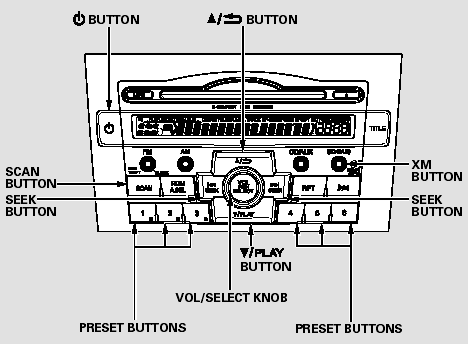
XM Radio receives signals from two satellites to produce clear, highquality digital reception. It offers many channels in several categories.
Along with a large selection of different types of music, XM Radio allows you to view channel and category selections in the display.
READ NEXT:
 Operating the XM Radio
To listen to XM radio, turn the
ignition switch to the ACCESSORY
(I) or the ON (II) position. Push the
button to turn on the audio
system, and press the ‘‘XM’’ button.
Adjust the vol
XM Radio Display Messages
‘‘LOADING’’ - XM is loading the
audio or program information.
‘‘OFF AIR’’ - The channel
currently selected is no longer
broadcasting.
‘‘UPDATING’’ - The encryptio
Receiving XM Radio Service
If your XM Radio service has expired
or you purchased your vehicle from
a previous owner, you can listen to a
sampling of the broadcasts available
on XM Radio. With the ignition
switch in th
SEE MORE:
Compass Zone Selection
In most areas, there is a variation
between magnetic north and true
north. Zone selection is required so
the compass can compensate for this
variation. To check and select the
zone, do this:
1. Press and hold the select/reset
knob for 10 seconds to change the
display to the reset mode
Crossing a Stream
Avoid driving through deep water. If
you encounter water in your route (a
small stream or large puddle, for
example), evaluate it carefully before
going ahead. Make sure it is shallow,
flowing slowly, and has firm ground
underneath. If you are not sure of
the depth or the ground, turn
© 2016-2026 Copyright www.hcrv.net
