
Honda CR-V: Fan Controls
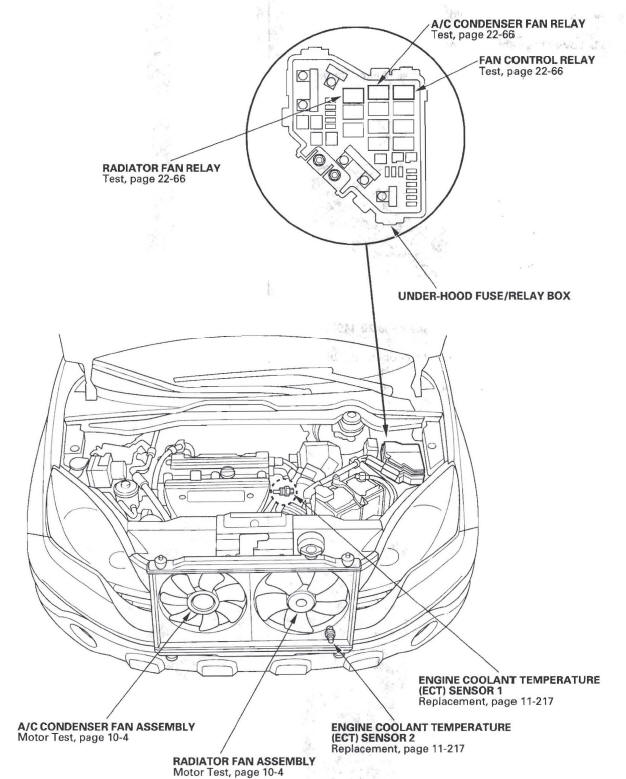
Component Location Index
- RADIATOR FAN RELAY
- A/C CONDENSER FAN RELAY
- FAN CONTROL RELAY
-
A/C CONDENSER FAN ASSEMBLY
-
RADIATOR FAN ASSEMBLY
-
ENGINE COOLANT TEMPERATURE
(ECT) SENSOR 1 -
ENGINE COOLANT TEMPERATURE
(ECT) SENSOR 2
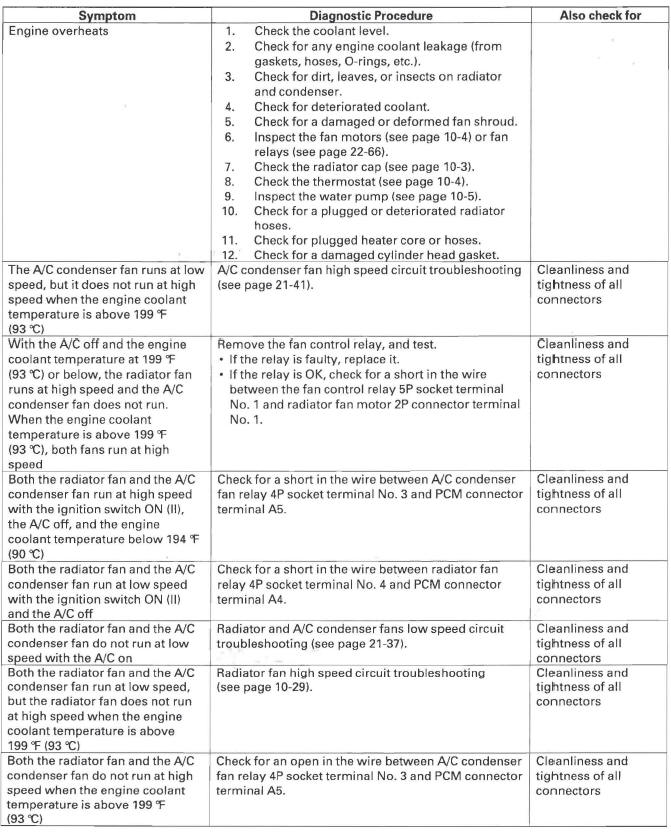
Symptom Troubleshooting Index
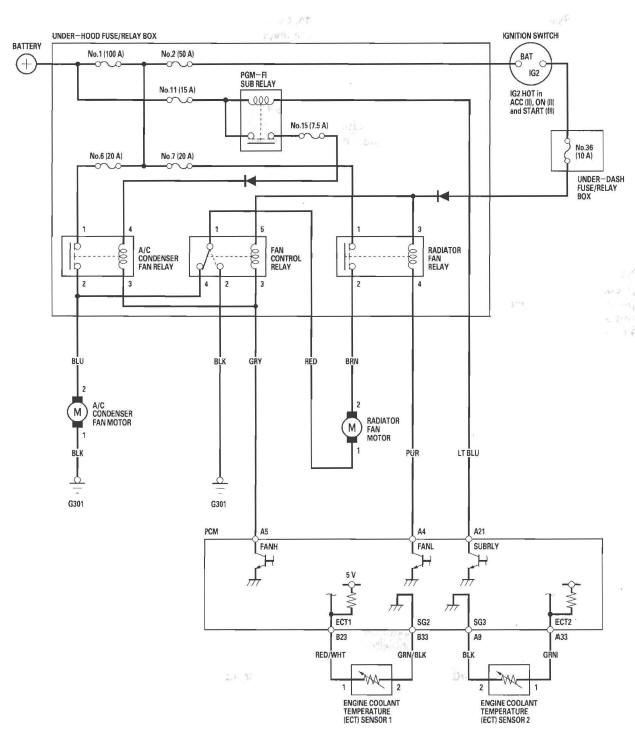
Circuit Diagram
Radiator Fan High Speed Circuit Troubleshooting
1. Remove the fan control relay from the under-hood fuse/relay box, and test it.
Is the relay OK?
YES-Go to step 2.
NO-Replace the fan control relay.
2. Measure the voltage between the fan control relay 5P socket terminal No. 5 and body ground.
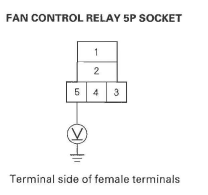
Is there battery voltage? YES-Go to step 3.
NO-Replace the under-hood fuse/relay box.
3. Check for continuity between the fan control relay 5P socket terminal No.2 and body ground.
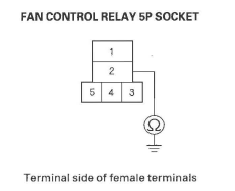
Is there continuity? YES-Replace the under-hood fuse/relay box.
NO-Repair open in the wire between the fan control relay 5P socket terminal No.2 and body ground. If the wire is OK, check for poor ground at G301.
READ NEXT:
 Fuel and Emissions Systems
Special Tools
Fuel Sender Wrench
Fuel Pressure Gauge Attachment Set
Vacuum/Pressure Gauge, 0-4 in.Hg
Pressure Gauge Adapter
Oil Pressure Hose
A/T Pressure Hose
A/T Low Pressure
General Troubleshooting Information
Intermittent Failures
The term "intermittent failure" means a system may
have had a failure, but it checks OK now. If the
malfunction indicator lamp (MIL) on the dash does not
come on, check for poor
SEE MORE:
DTC P0335: CKP Sensor No Signal
NOTE: Before you troubleshoot, record all freeze data and any on-board
snapshot, and review the general troubleshooting information.
1. Turn the ignition switch ON (II).
2. Clear the DTC with the HDS.
3. Start the engine.
4. Check for Temporary DTCs or DTCs with the HDS.
Is DTC P0335 indicated
Playing the XM Radio
On EX-L without Navigation System
Your vehicle is capable of receiving
XM Radio anywhere in Canada and
the United States, except Hawaii,
Alaska, and Puerto Rico. XM
CANADA is a registered business
name of Canadian Satellite Radio Inc.,
and XM is a registered trademark of
Sirius XM Rad
