
Honda CR-V: Sunglasses Holder
Honda CR-V (2006–2011) Owner's Manual / Instruments and Controls / Interior Convenience Items / Sunglasses Holder
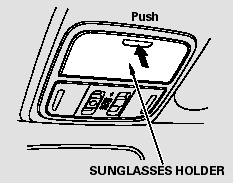
To open the sunglasses holder, push then release the raised detent. It will unlatch and swing down. To close it, push it until it latches. Make sure the holder is closed while you are driving.
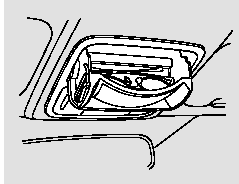
Some larger styles of sunglasses may not fit in the holder.
You may also store small items in this holder. Make sure they are small enough to let the holder close and latch, and that they are not heavy enough to cause the holder to pop open while driving.
READ NEXT:
 ConversationMirror
The sunglasses holder uses a convex
mirror for its bottom panel. You can
see all the vehicle passengers in this
mirror. To use the mirror, open the
sunglasses holder fully, push it to the
Accessory Power Sockets
Your vehicle has two or three
accessory power sockets depending
on the model.
To use an accessory power socket,
the ignition switch must be in the
ACCESSORY (I) or ON (II) position.
Console Compartment
EX-L model
Push the release knob to open or
close the console compartment, slide
the lid rearward.
SEE MORE:
Inflation Guidelines
Keeping the tires properly inflated
provides the best combination of
handling, tread life, and riding
comfort.
Underinflated tires wear unevenly,
adversely affect handling and fuel
economy, and are more likely to
fail from being overheated.
Overinflated tires can make your
vehicle ri
Vehicle Stability Assist (VSA ), aka Electronic Stability Control (ESC),
System
The vehicle stability assist (VSA)
system helps to stabilize the vehicle
during cornering if the vehicle turns
more or less than desired. It also
assists you in maintaining traction
while accelerating on loose or
slippery road surfaces. It does this
by regulating the engine’s output
© 2016-2026 Copyright www.hcrv.net
