
Honda CR-V: Sun Visor
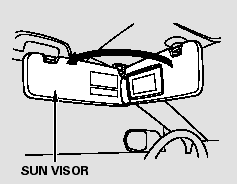
To use the sun visor, pull it down.
When using the sun visor for the side window, remove the support rod from the clip, and swing it out.
Make sure you put the sun visor back in place when you are getting into or out of the vehicle.
READ NEXT:
 Sunglasses Holder
To open the sunglasses holder, push
then release the raised detent. It will
unlatch and swing down. To close it,
push it until it latches. Make sure the
holder is closed while you are driv
ConversationMirror
The sunglasses holder uses a convex
mirror for its bottom panel. You can
see all the vehicle passengers in this
mirror. To use the mirror, open the
sunglasses holder fully, push it to the
Accessory Power Sockets
Your vehicle has two or three
accessory power sockets depending
on the model.
To use an accessory power socket,
the ignition switch must be in the
ACCESSORY (I) or ON (II) position.
SEE MORE:
To Change or Select Tracks/Files
You can use the SEEK button while
a disc is playing to change tracks
(files in MP3/WMA mode).
In MP3/WMA mode, use the
or
button to select
folders in the disc, and use the SEEK
button to change files.
SEEK/SKIP - Each time you
press and release the
side, the
player skips forwa
Safety Labels
These labels are in the locations
shown. They warn you of potential
hazards that could cause serious
injury or death. Read these labels
carefully.
If a label comes off or becomes hard
to read (except for the U.S.
dashboard label which may be
removed by the owner), contact your
dealer
© 2016-2026 Copyright www.hcrv.net
