
Honda CR-V: Seats
Honda CR-V (2006–2011) Service Manual / Body / Seats
Component Location Index
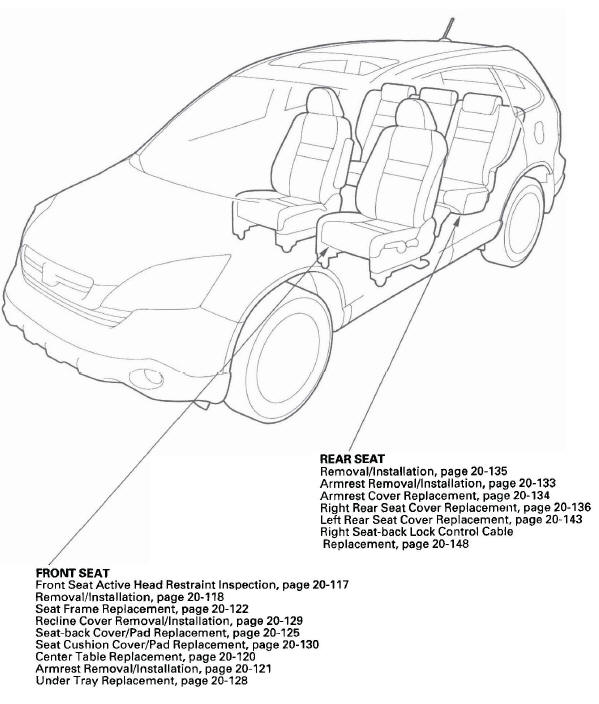
- REAR SEAT
- Removal/Installation
- Armrest Removal/Installation
- Armrest Cover Replacement
- Right Rear Seat Cover Replacement
- Left Rear Seat Cover Replacement
- Right Seat-back Lock Control Cable Replacement
- FRONT SEAT
- Front Seat Active Head Restraint Inspection
- Removal/Installation
- Seat Frame Replacement
- Recline Cover Removal/Installation
- Seat-back Cover/Pad Replacement
- Seat Cushion Cover/Pad Replacement
- Center Table Replacement
- Armrest Removal/Installation
- Under Tray Replacement
READ NEXT:
 Front Seat
Front Seat Active Head Restraint Inspection
NOTE: If the vehicle has been in a collision, always
inspect the active head restraints, even if they appear
reusable, by doing the following procedure.
Res
Rear Seat
Rear Seat Armrest Removal/Installation
NOTE: Take care not to tear the seams or damage the
seat covers.
1. Remove the E-ring (A) from the right side portion
on the armrest pivot.
2. Slide the armres
SEE MORE:
Moonroof
Component Location Index
GLASS
DRAIN CHANNEL
SUNSHADE
CABLE ASSEMBLY
CABLE TUBE
REAR BRACKET
MOTOR
WIND DEFLECTOR
REAR DRAIN TUBE
REAR DRAIN VALVE
FRAME
CLIP
FRONT DRAIN VALVE
FRONT DRAIN TUBE
Symptom Troubleshooting Index
Glass Position Adjustment
The roof panel (A) should be ev
To Select a Station
You can use any of five methods to
find radio stations on the selected
band: tune, seek, scan, the preset
buttons, and auto select.
TUNE - Use the TUNE knob to
tune the radio to a desired frequency.
Turn the knob to the right to tune to
a higher frequency, and turn it to the
left to tu
© 2016-2026 Copyright www.hcrv.net
