
Honda CR-V: Adding Engine Oil
Honda CR-V (2006–2011) Owner's Manual / Maintenance / Adding Engine Oil
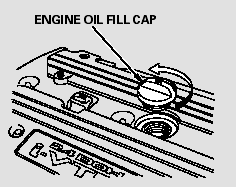
Unscrew and remove the engine oil fill cap on top of the valve cover.
Pour in the oil slowly and carefully you do not spill any. Clean up any spills immediately. Spilled oil could damage components in the engine compartment.
Reinstall the engine oil fill cap, and tighten it securely. Wait a few minutes, and recheck the oil level on the engine oil dipstick. Do not fill above the upper mark; you could damage the engine.
READ NEXT:
 Recommended Engine Oil
Oil is a major contributor to your
engine’s performance and longevity.
Always use a premium-grade 0W-20
detergent oil displaying the API
Certification Seal. This seal indicates
the oil is e
Synthetic Oil
You may use a synthetic motor oil if
it meets the same requirements
given for a conventional motor oil: it
displays the API certification seal,
and it is the proper weight. You must
follow t
Engine Oil Additives
Your vehicle does not require any oil
additives. Additives may adversely
affect the engine or transmission
performance and durability.
SEE MORE:
To Play a CD
To play CDs, the ignition switch
must be in the ACCESSORY (I) or
ON (II) position.
You operate the CD changer with
the same controls used for the indash
disc player or the radio. To
select the CD changer, touch the
CDC icon. The disc and track
numbers are displayed. The system
will
Fuel Pump Circuit Troubleshooting
If you suspect a problem with the fuel pump, check that
the fuel pump actually runs; when it is on, you will hear
some noise if you listen to the fuel fill port with the fuel
f ill cap removed. The fuel pump should run for
2 seconds when the ignition switch is first turned on. If
the fuel pump does
© 2016-2026 Copyright www.hcrv.net
