
Honda CR-V: Glass
Honda CR-V (2006–2011) Service Manual / Body / Glass
Component Location Index
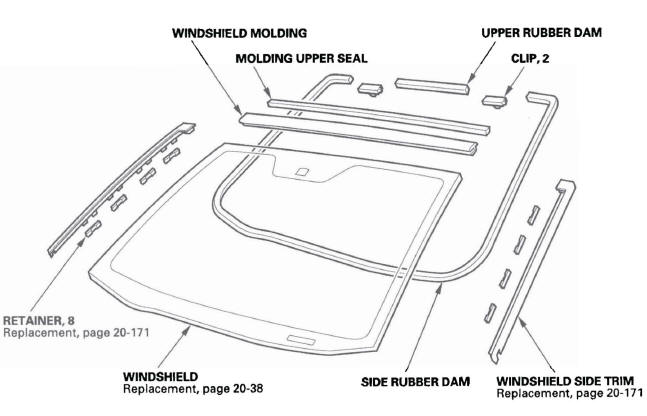
- WINDSHIELD MOLDING
- MOLDING UPPER SEAL
- UPPER RUBBER DAM
- CLIP, 2
- WINDSHIELD SIDE TRIM
- SIDE RUBBER DAM
- WINDSHIELD
- RETAINER,8
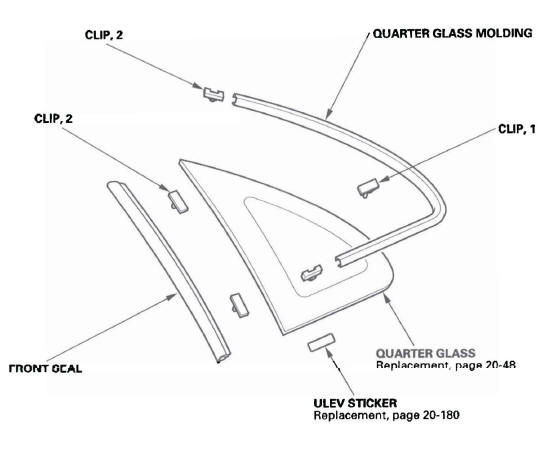
- QUARTER GLASS MOLDING
- CLIP, 1
- CLIP, 2
- QUARTER GLASS
- ULEV STICKER
- FRONT SEAL
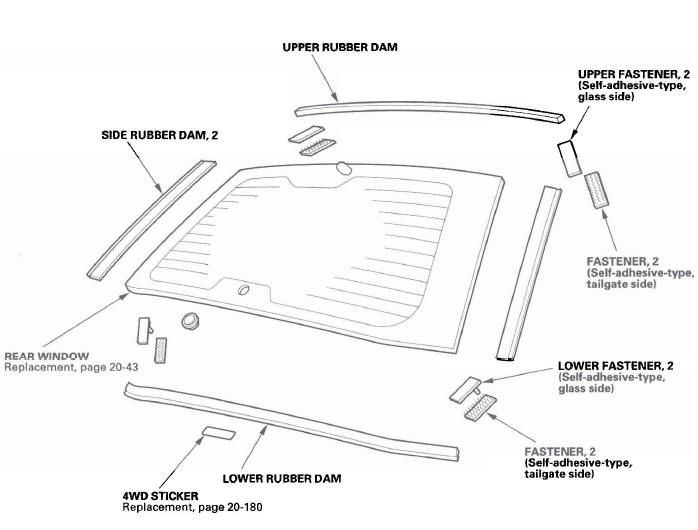
- UPPER RUBBER DAM
- UPPER FASTENER 2
- FASTENER 2
- LOWER FASTENER 2
- LOWER RUBBER DAM
- 4 WD STICKER
- REAR WINDOW
READ NEXT:
 Windshield Replacement
NOTE:
Put on gloves to protect your hands.
Wear eye protection when removing the glass with
piano wire.
Use seat covers to avoid damaging the seat.
When replacing a broken windshield, a commerci
Rear Window Replacement
NOTE:
Put on gloves to protect your hands.
Wear eye protection when removing the glass with
piano wire.
Use seat covers to avoid damaging any surfaces.
Do not damage the rear window defogger gri
Quarter Glass Replacement
NOTE:
Put on gloves to protect your hands.
Wear eye protection when removing the glass with
piano wire.
Use seat covers to avoid damaging any surfaces.
The quarter glass molding will need replac
SEE MORE:
Crossing a Stream
Avoid driving through deep water. If
you encounter water in your route (a
small stream or large puddle, for
example), evaluate it carefully before
going ahead. Make sure it is shallow,
flowing slowly, and has firm ground
underneath. If you are not sure of
the depth or the ground, turn
Using a Track List
You can also select a file directly
from a track list on the audio display.
Press the AUDIO button to show the
audio display, then touch the Track
List icon. The track list menu
appears on the display.
To scroll through the display, touch
the
or
icon on the side of the
scr
© 2016-2026 Copyright www.hcrv.net
