
Honda CR-V: Controls Near the Steering Wheel
Honda CR-V (2006–2011) Owner's Manual / Instruments and Controls / Controls Near the Steering Wheel
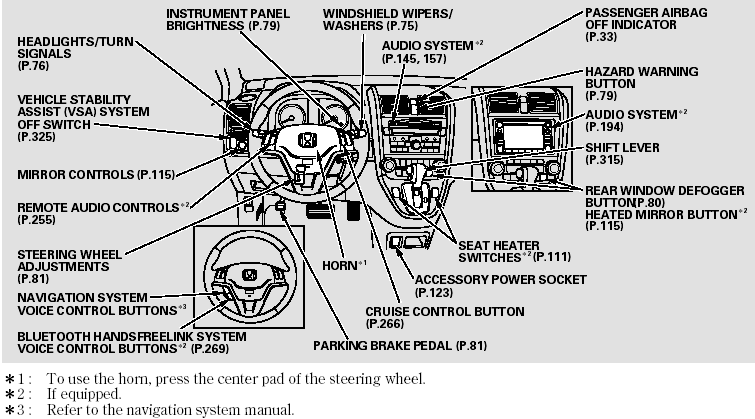
Controls Near the Steering Wheel
READ NEXT:
 Windshield Wiper
1. MIST
2. OFF
3. INT Intermittent
4. LO Low speed
5. HI High speed
6. Windshield washers
Push the right lever up or down to
select a position.
MIST - The wipers run at high
speed until
WindshieldWashers
Pull the
wiper control lever toward you, and
hold it. The washers spray until you
release the lever. The wipers run at
low speed, then complete one more
sweep after you release the lever.
SEE MORE:
APP Sensor Signal Inspection
NOTE:
This procedure checks the APP sensor in its fully
closed position. In any other position, the APP sensor
stores DTCs which are covered in other
troubleshooting procedures.
Check for Temporary DTCs or DTCs with the HDS
before doing this procedure. If any DTCs are
indicated, troubleshoot
To Stop Playing a PC Card
To play the radio when a PC card is
playing, press the AM/FM button or
touch the FM1, FM2, AM, XM1, or
XM2 icon. If a disc is in the audio
unit, press the CD/XM button or
touch the CD icon to play the disc. If
a CD or CDs are in the CD changer,
touch the CDC icon to play the
disc(s).
© 2016-2026 Copyright www.hcrv.net
