
Honda CR-V: Maintenance Main Items and Sub Items
Honda CR-V (2006–2011) Owner's Manual / Maintenance / Maintenance Minder / Maintenance Main Items and Sub Items
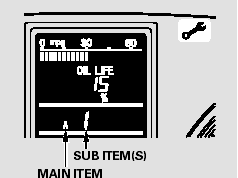
All maintenance items displayed on the information display are in code.
For an explanation of these maintenance codes.
READ NEXT:
 Resetting the Engine Oil Life Display
Your dealer will reset the display
after completing the required
maintenance service. You will see
‘‘OIL LIFE 100%’’ on the information
display the next time you turn the
ignition sw
Important Maintenance Precautions
If you have the required service
done but do not reset the display, or
reset the display without doing the
service, the system will not show the
correct maintenance intervals. This
can lead
Owner’s Maintenance Checks
You should check the following
items at the specified intervals. If
you are unsure of how to perform
any check, turn to the appropriate
page listed.
Engine oil level - Check every
time you
SEE MORE:
Using a Track List
You can also select a file directly
from a track list on the audio display.
Press the AUDIO button to show the
audio display, then touch the Track
List icon. The track list menu
appears on the display.
To scroll through the display, touch
the
or
icon on the side of the
scr
VSA (Vehicle Stability Assist) System Components
Component Location Index
VSA MODULATOR-CONTROL UNIT
Removal and Installation
UNDER-HOOD FUSE/RELAY BOX
DATA LINK
CONNECTOR (DLC)
STEERING ANGLE SENSOR
Replacement
VSA OFF SWITCH
Test
RIGHT-REAR WHEEL SENSOR
Replacement
HUB BEARING UNIT
(MAGNETIC ENCODER)
Replace
© 2016-2026 Copyright www.hcrv.net
